Your ultimate guide to the modern workout builder
Discover how a modern workout builder uses AI to create personalized fitness plans that eliminate guesswork and accelerate your strength and muscle gains. A modern workout builder is essentially a smart app that takes the guesswork out of your training. It creates personalized, structured routines based on your goals, experience, and whatever equipment you have on hand. Think of it as a digital personal trainer, designing a clear path to get you the results you want.
What is a workout builder and why is it a game changer?
Imagine a workout builder as a GPS for your fitness journey. Instead of wandering aimlessly around the gym, you get precise, turn-by-turn directions to take you from where you are to where you want to be—whether that’s building muscle, boosting endurance, or just getting stronger.
It’s designed to solve a problem that plagues almost every gym-goer at some point: "analysis paralysis." That feeling of not knowing what to do next.
This indecision often leads to doing the same old ineffective routines over and over, or worse, skipping workouts altogether. A workout builder cuts right through that noise, giving you a structured plan you can actually follow with confidence. For busy professionals or dedicated athletes who need to make every minute count, that efficiency is a massive advantage.
Built for progress
Take the guesswork out of training
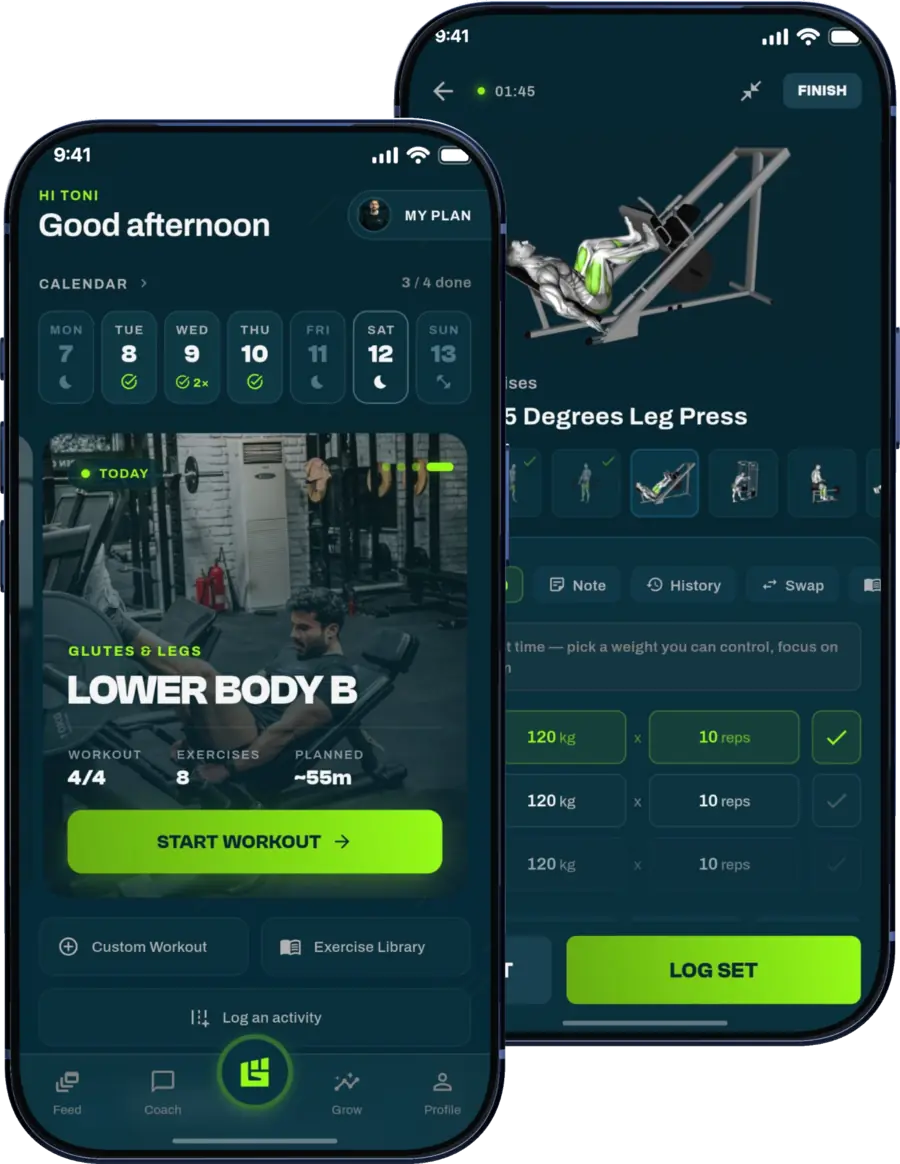
Get a personalized workout plan built around your goal, equipment and schedule. Train smarter, track every rep and keep moving forward, one workout at a time.






The demand for these intelligent tools has sent the market soaring. The fitness app sector, especially the part focused on personalized exercise planning, is expected to jump from $8.53 billion to a staggering $75.67 billion by 2033. This isn't just a trend; it's a clear shift toward smarter, data-driven training that fits how we live today.
Before we dive deeper, let's quickly compare the old way of doing things with the new approach.
Manual planning vs smart workout builder
| Feature | Manual Workout Planning | AI Workout Builder |
|---|---|---|
| Personalization | Generic templates or self-researched plans | Tailored to individual goals, equipment, and schedule |
| Adaptability | Static; requires manual adjustments over time | Learns and adapts workouts based on your performance |
| Time Investment | Hours of research and planning required | Generates a complete plan in minutes |
| Expertise Needed | High; relies on your knowledge of programming | Low; guided by built-in fitness principles |
| Progress Tracking | Manual logging (pen and paper, spreadsheets) | Automatic tracking and performance analysis |
The table makes it pretty clear: while manual planning has its place, a smart builder automates the tedious parts so you can focus on the actual work.
Personalized plans without the price tag
One of the biggest wins is getting a highly customized plan without shelling out for a one-on-one coach. The app just asks the right questions upfront:
- What’s your main goal? (Muscle growth, fat loss, functional fitness?)
- How many days a week can you train?
- What gear do you have? (Full gym, home dumbbells, or just your bodyweight?)
Based on your answers, the workout builder puts together a program that fits your exact situation. This kind of personalization used to be a luxury reserved for those who could afford a personal trainer.
Evolving with you for continuous progress
But here’s the best part: a smart workout builder doesn’t just hand you a static plan and wish you luck. It actually learns from your performance.
A truly adaptive workout builder acts as your digital training partner. It tracks every set and rep, adjusting future workouts to ensure you’re always challenged just enough to stimulate growth without causing burnout.
This concept, progressive overload, is the absolute cornerstone of getting fitter and stronger. As you improve, the system automatically makes things a bit harder—by adjusting weight, reps, or sets—so you never hit that frustrating plateau. It’s a common roadblock when following generic, one-size-fits-all plans.
Platforms like GrabGains are built around this exact principle, turning the performance you log into smart, actionable recommendations for your very next session.
How a workout builder makes your training plan smarter
Let's pull back the curtain on what makes the best workout builders tick. The secret sauce is an adaptive algorithm, but it’s not as intimidating as it sounds. Think of a smart workout builder as a digital personal trainer that gets to know you better with every single workout.
The whole system is built around one of the most important principles in fitness: progressive overload. It’s the simple idea that to get stronger, you have to consistently ask your body to do a little more than it's used to. The algorithm just automates that process with precision.
It logs every rep and set you complete, learning where you excel and where you struggle. Then, it uses that data to make tiny, smart tweaks for your next session, making sure you’re always pushing forward without hitting a wall.
The power of adaptive algorithms
At the core of any smart workout builder are its adaptive algorithms. These are the complex rules that turn your performance data into a new, better plan. It's like having a coach who not only watches you lift but also crunches all the numbers behind the scenes.
For example, if you nail your squat targets and feel solid, the algorithm doesn't just keep you at the same weight. It will automatically suggest a small jump in weight or an extra rep for your next leg day. This keeps you in that sweet spot for growth, without the risk of jumping too far ahead and getting hurt.
This kind of smart guidance takes all the guesswork out of your training. You no longer have to ask, "Should I lift more?" or "Was that enough?" The builder makes those evidence-based calls for you.
An adaptive workout builder turns your workout data into a dynamic, evolving roadmap. Instead of following a static map, you're guided by a system that reroutes and adjusts in real-time based on your actual progress.
This allows for personalization on a scale that was never possible before. A sophisticated algorithm can generate millions of unique training plans, each fine-tuned to someone's specific goals, equipment, and real-time performance.
How it works in a real-world scenario
Let’s say you’re using a smart workout builder to improve your bench press. Here's a quick look at how the builder would adapt your plan from one week to the next:
- Initial Plan: The builder sets up your first workout based on your goals and experience. It might schedule 3 sets of 8 reps at 135 lbs.
- Performance Logging: You log that you hit all your reps and sets, noting that the last set felt tough but doable.
- Data Analysis: The algorithm crunches the numbers. It sees you met the target and probably had a little more in the tank.
- Smart Adjustment: For your next chest day, the builder applies progressive overload. It might bump you up to 3 sets of 8 reps at 140 lbs or maybe 3 sets of 9 reps at 135 lbs.
This constant feedback loop is what makes an adaptive plan so effective. If you had struggled with that last set, the app might have kept the weight the same for next time, letting your body adapt first. You can see how these smart fitness apps structure adaptive plans when you discover the GrabGains app. The system works with you, preventing both frustrating plateaus and burnout.
Key features of a high-performance workout builder
Picking the right workout builder can feel like a chore, but a few key features separate the genuinely useful tools from the simple ones. You need to know what to look for, otherwise you'll end up with a glorified spreadsheet instead of a platform that actually moves you forward. Think of it like buying a car—you have to look under the hood, not just at the paint job.
The heart of any great builder is its comprehensive exercise library. This isn't just about having a long list of movements; it's about quality. The best ones include clear, professionally shot video demonstrations for every single exercise. Proper form is everything when it comes to preventing injuries and actually getting results.
A good library also gives you detailed instructions and points out the primary muscles you're working. This is huge, because it helps you understand the why behind your workout, not just the what. If you're building a routine for bigger arms, you need more than just bicep curls—you need variations, and a solid library will have them.
Robust progress tracking and analytics
A workout builder without solid tracking is like a GPS that doesn't show you where you've been. Seeing your progress is what keeps you motivated and helps you make smarter training decisions down the road. The best apps offer visual analytics, turning your logged sets and reps into simple charts and graphs you can actually understand.
This lets you see your strength gains over time, keep an eye on your total workout volume, and spot patterns in your performance. There's nothing more motivating than seeing your bench press numbers climb week after week. It’s this kind of data-driven feedback that helps you stick with it for the long haul.
A top-tier workout builder provides more than just a plan; it delivers insights. By visualizing your progress, you transform abstract goals into tangible achievements, fueling your motivation to keep pushing forward.
True customization and adaptability
Finally, the best workout builders are both smart and flexible. True adaptability means the plan actually evolves with you, automatically adjusting based on the performance data you log. On top of that, strong customization options give you control when life gets in the way.
What happens when the squat rack is taken? A great workout builder will let you easily swap that exercise for an alternative, like a dumbbell goblet squat or leg press, without throwing off your whole session. Maybe you want to add your own custom exercises or build a routine to hit a specific area, like exploring different shoulder exercises. Our guide on how to build stronger shoulders with the right exercises can give you some ideas.
This combination of smart guidance and personal control is what makes a digital tool genuinely useful in the real world. It's also why the global fitness app market, valued at USD 17.71 billion, is exploding as more people adopt these tools. Beginners, especially, see huge benefits from guided form, which can slash newbie injury rates by as much as 40%. You can read more about the growth of the fitness app market.
To help you sort through the options, here's a quick checklist of the essential features to look for.
Essential workout builder feature checklist
A good workout builder does more than just list exercises; it gives you the tools to train smarter. Use this table as a quick reference to make sure the app you choose has everything you need to support your goals.
| Feature | Why It Matters | Example Application |
|---|---|---|
| Video Exercise Library | Ensures you perform movements correctly and safely, which is critical for preventing injury. | Watching a 15-second clip to confirm your form on a Romanian Deadlift before you start the set. |
| Progress Tracking | Lets you see tangible proof of your hard work, keeping you motivated and informed. | Viewing a graph of your squat 1RM (one-rep max) over the last three months to see your strength gains. |
| Customizable Workouts | Gives you the flexibility to adjust your plan based on equipment availability or preference. | Swapping barbell bench press for dumbbell press when the benches are all taken at the gym. |
| Performance-Based Adaptability | The app adjusts future workouts based on your performance, ensuring you're always challenged. | After you log 10 reps easily, the app suggests increasing the weight by 5 lbs for your next session. |
| Workout Logging | Creates a detailed training history, helping you identify what works and what doesn't. | Looking back at your log from last week to remember the weight and reps you hit on your shoulder press. |
| Rest Timers | Keeps your workout on track and ensures you're resting the optimal amount between sets. | An automatic 90-second timer starts as soon as you log a set, buzzing when it's time for the next one. |
By prioritizing these features, you can be confident you’re choosing a tool that will act as a true training partner, helping you stay consistent and make real progress.
Creating your first smart workout plan step by step
Alright, you get what a high-performance workout builder is all about. Now it’s time to actually use one. Firing up your first smart plan is a quick, painless process designed to get you from zero to your first session as fast as possible.
Think of it like a quick intake with a digital personal trainer. The idea is to feed the system just enough info for it to create a starting point that’s safe, effective, and built just for you.
Defining your primary goal
First things first: you have to tell the builder what you’re trying to accomplish. Are you here to build muscle (hypertrophy), get brutally strong (strength), or just improve your fitness for everyday life (functional fitness)? This single choice shapes everything that comes next, from the exercises it picks to the sets and reps it assigns.
For example, a hypertrophy plan will lean into higher volume and moderate weight. A strength plan, on the other hand, will have you lifting heavy for fewer reps. Be honest about what you really want.
Your goal is the foundation. A great workout builder takes that input, runs it through its own logic, and spits out a plan that gets you there. This workflow is pretty standard across the board.
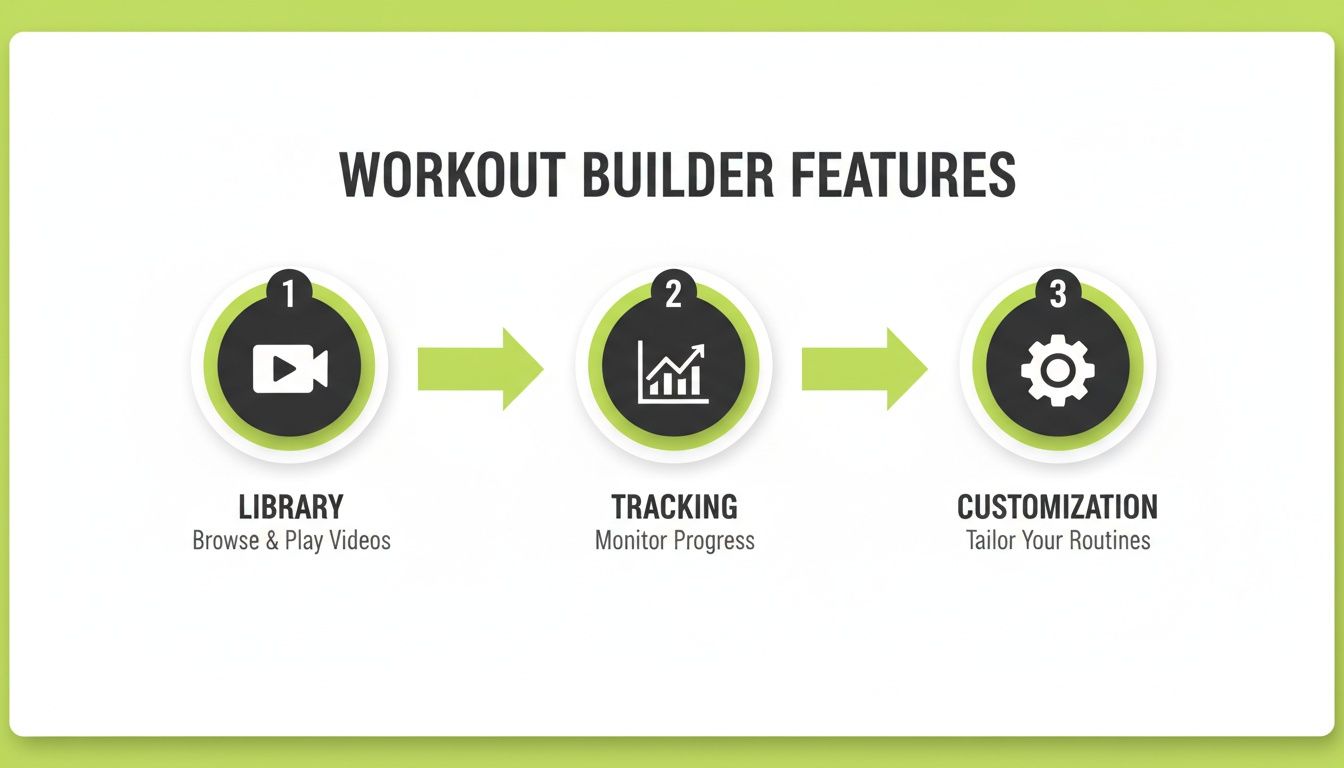
As the infographic shows, it’s a constant loop: you get exercises from a library, you track your progress, and the plan adapts. Simple.
Inputting your stats and experience
Next up, the app needs to know your training history. This isn't the time for ego. If you're a beginner, say you're a beginner. If you're intermediate or advanced, own it. Getting this right ensures your program kicks off at an intensity that’s challenging but won't crush you.
It might also ask for your one-rep max (1RM) on big lifts like the squat, bench, or deadlift. If you have no clue what those numbers are, don’t sweat it. Most apps can estimate them for you or have a built-in calculator. This data gives the app the numbers it needs to set your starting weights precisely.
A smart workout builder uses your initial stats as a baseline, not a final judgment. The plan is designed to adapt, so providing accurate data ensures your first few workouts are challenging but achievable, setting you up for consistent success.
Setting your schedule and equipment
Your workout plan has to fit into your life, not the other way around. Tell the app how many days a week you can actually get to the gym. Whether it's three days or five, the builder will create the right training split for you.
Just as important is your equipment. Do you have a fully-stocked commercial gym? A couple of dumbbells at home? Or just your bodyweight? The algorithm will filter its exercise library to build workouts using only the tools you have. No more useless exercises you can’t even perform.
Once you’ve plugged all that in, you’re ready to go. The builder will generate your full plan, laying out every exercise, set, rep, and rest period. Give it a quick once-over to make sure it looks right, then get ready for your first session. If you’re looking to build up your lower body, you can dig into our guide on the best leg exercises for building strength and size.
Pro tips for maximizing your gains
Getting a plan from a workout builder is a great start, but it's just that—a start. The real progress comes when you stop just following instructions and start partnering with the technology. Think of your first plan as the starting coordinates on a map; your daily actions decide how fast and efficiently you reach your destination.
Success really boils down to two things: consistency and accurate data logging. The app is only as smart as the information you feed it. If you log your reps, sets, and weights with precision every time you train, the algorithm gets the quality data it needs to make smart adjustments for your next session.
Go beyond the numbers
While performance data like weight lifted is crucial, it doesn't tell the whole story. The best workout builders let you track more than just your lifts, giving you a much clearer picture of your progress, which is a huge motivator.
To see the complete picture, make sure you’re using features like:
- Progress Photos: A picture is worth a thousand words, and that’s especially true in fitness. Taking photos every week or two can show you visual changes the scale might miss.
- Body Measurements: Tracking your chest, waist, and limb measurements gives you objective data on how your body composition is changing. Gaining an inch on your arms is a definite win, even if the scale hasn't moved.
When you combine these metrics with your performance data, you see progress from every angle. It keeps you locked in and focused on the big picture.
Treat your builder as a dynamic partner
Life happens. A rigid, unforgiving training plan is a fast track to burnout. This is where you need to shift your mindset from just "using an app" to actively working with a smart tool.
The most effective way to use a workout builder is to treat it as a responsive training partner. Provide it with honest feedback, listen to your body, and use the app’s flexibility to adjust for rest, recovery, and life’s curveballs.
Feeling worn down? Use the app to schedule a lighter session or an active recovery day. Got a surprise work trip? Adjust your weekly schedule in a few taps. For example, you can explore our library of effective back exercises to swap in movements you can do with the hotel's dumbbells. This adaptability is what makes long-term progress possible.
Workout builder apps are seriously changing the game, and the results are measurable. For lifters focused on muscle growth, builders that use progressive tracking have been shown to deliver 25% better results in bench press strength in just eight weeks. Endurance athletes have also been able to cut their training time by 20% while achieving the same VO2 max gains through smart, adaptive planning. Learn more about key fitness industry trends and statistics. By embracing these tools as dynamic partners, you can hit your goals more effectively than ever before.
Common questions about workout builders
Even after seeing what a workout builder can do, you probably have a few practical questions. That’s smart. You’re investing time and energy into a new training tool, so let’s clear up some of the most common questions and make sure you have all the answers you need.
Can a workout builder truly replace a personal trainer?
This is the big one, and the honest answer is: it depends. For a self-motivated person who just needs expert programming and a clear path forward, a smart workout builder is an incredible, cost-effective alternative. It delivers evidence-based adjustments and handles progressive overload without the hefty price tag of a human coach.
But it can’t provide the real-time, in-person form correction or the accountability that a great trainer offers. For absolute beginners or anyone working around a specific injury, a hybrid approach is often the perfect solution. You can use the workout builder for your daily programming and book a trainer for a handful of sessions to dial in your form on the big lifts.
A workout builder masters the "what" and "when" of training—giving you the right exercises and progression. A personal trainer masters the "how"—offering immediate feedback on your movement and providing hands-on motivation.
Are workout builders a good choice for beginners?
Absolutely. In fact, a quality workout builder is often the best possible starting point for a beginner. It completely removes that feeling of walking into a gym and having no clue what to do, which is one of the biggest hurdles for new lifters. That guidance is crucial for building confidence and making training a consistent habit.
The best platforms also come with huge exercise libraries, complete with clear video demonstrations for every movement. This is invaluable for learning proper form and avoiding the common mistakes that can sideline newcomers. The adaptive algorithm also makes sure your workouts start at a sensible level and progress safely, building a solid fitness foundation without ever feeling overwhelming.
What if I only have access to home gym equipment?
This is where a modern workout builder really proves its worth. These tools are built for total flexibility and can create effective programs for just about any environment. During the initial setup, you just tell the app what you have.
Your options might include:
- Full Commercial Gym: Access to every machine, rack, and free weight imaginable.
- Basic Home Gym: A few dumbbells, some resistance bands, and maybe a pull-up bar.
- Bodyweight Only: No equipment at all, which is perfect for travel or just starting out.
The algorithm takes that information and gets to work, generating challenging and effective workouts using only the tools you have on hand. It ensures you can get a great session in, whether you’re at a state-of-the-art facility or just in your living room.
How does the app actually adapt my workouts?
It’s all driven by the data you feed it after each session. The system is constantly comparing your actual performance—the weight you lifted and the reps you completed—against the targets it originally set for you.
If you’re consistently hitting or beating those targets, the app applies progressive overload. It will automatically bump up the weight, reps, or sets for that exercise the next time you do it. On the flip side, if you struggled to hit your numbers, it might dial back the intensity just enough to give your body more time to adapt. This constant, data-driven feedback loop keeps your program perfectly balanced between challenging and achievable—the key to breaking through plateaus and avoiding burnout.
Ready to stop guessing and start progressing? The GrabGains workout builder creates a plan that's 100% tailored to you, your equipment, and your goals. See how a truly adaptive plan can transform your training by downloading GrabGains on iOS or Android today. Experience the future of fitness.
Get inspired and motivated