Workout Log Template: Options Sorted by Training Goal
Compare workout log template options for strength, hypertrophy, endurance, HYROX and beginners, with setup tips for sets, reps, RPE and progress. You're mid-session, one hand on the phone, the other still chalked up from your last squat set. The notebook on the rack has half a plan and no record of what you did last week, which is why a workout log template has to be more than a blank page. The best one matches the way you train, whether you care about strength, hypertrophy, endurance, HYROX prep, or just getting consistent without overthinking every line.
What matters is simple. A good entry records date, exercise, load, sets, repetitions, duration, RPE, tempo, rest, volume, and completion status, because that's the kind of structure people have historically used in diaries and calendars to track adherence, not just in apps PMC study on adherence logging. The right template makes those fields easy to capture fast, then lets you see what changed from one session to the next. It should also tell you where it breaks down, because no single format works for every lifter, every schedule, or every goal. For wrist comfort while you're typing between sets, this wrist support guide is a useful companion read.
1. GymAdapt
GymAdapt feels like the straightforward coach's clipboard version of a workout log template. It's a clean PDF and spreadsheet combo, so beginners don't get lost and intermediates can still use it to reinforce progressive overload with simple “last time, next time” notes. The strength of the format is that it keeps the page focused on the session in front of you, not on building a whole training system.
Where it works
The printable sheet is easy to follow in the gym, and the spreadsheet version gives you a digital copy if you prefer to type after training. The emphasis on actionable notes is the main win, because “what to try next session” is often more useful than another empty column. That lines up with the way workout history should be used, as a record that helps you review progress over time rather than just a place to dump numbers PMC adherence study.
Built for progress
Take the guesswork out of training
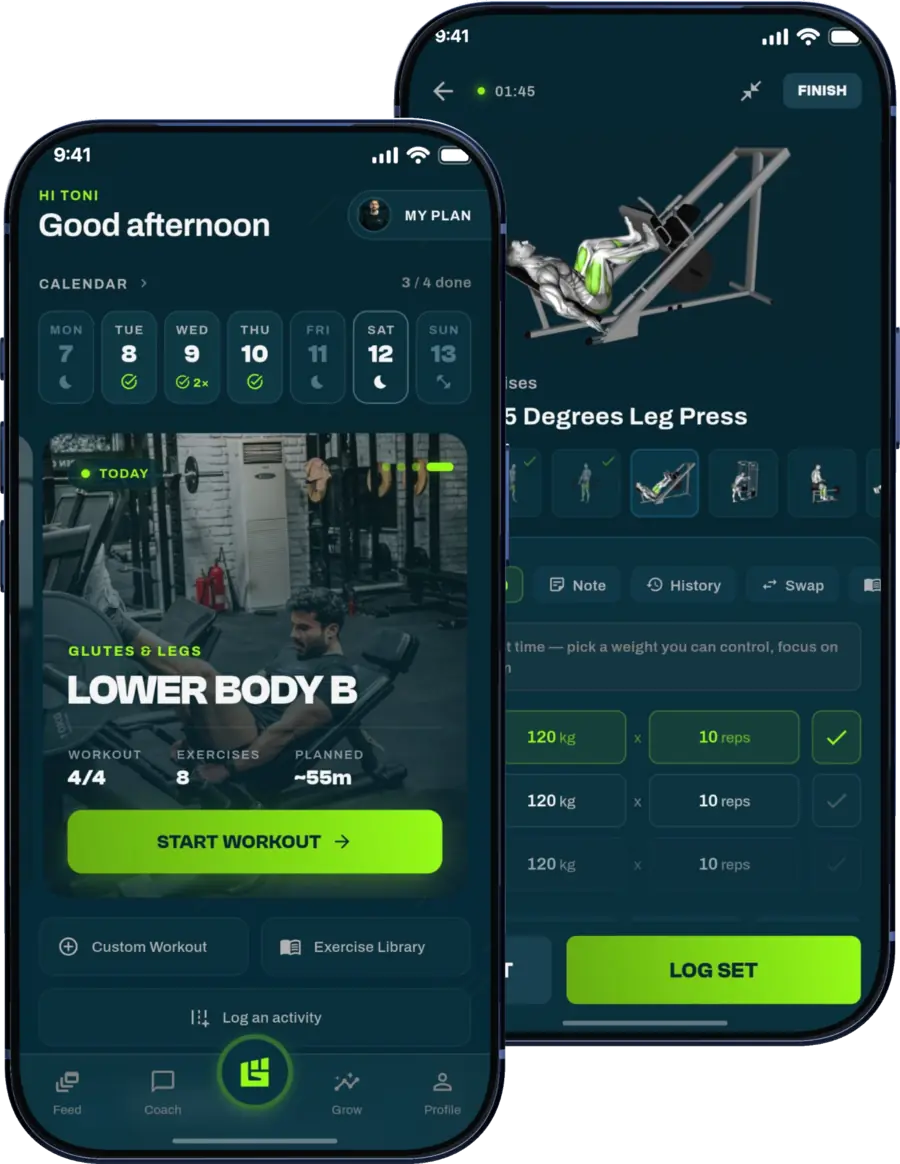
Get a personalized workout plan built around your goal, equipment and schedule. Train smarter, track every rep and keep moving forward, one workout at a time.






Where it breaks down
GymAdapt is not trying to be a full program planner, and that's a real limitation for trainees who want automatic branching when a session goes badly. It also doesn't lean into advanced analytics, so if you want charts, comparisons, or adaptive adjustments, you'll outgrow it fast. For people who just want to write the set, the load, and the next target, it stays refreshingly simple.
Practical rule: Use this when you want the fewest moving parts possible, especially for beginner and intermediate strength work.
Visit GymAdapt's free workout log template
2. TrainAI
TrainAI is the kind of workout log template you open when you don't want to create an account, install software, or hand over your email just to start logging. The in-browser editor is simple, and the export options to CSV or printable PDF make it easy to move your notes into Excel, Google Sheets, or Numbers later. It's a good fit for someone who wants speed first and automation later.
What it records well
The template supports sets, reps, duration, load, units, and notes, which covers the basics most lifters use. That's enough for quick logging during strength sessions, conditioning blocks, or hybrid training days. It also has a blank worksheet printing mode, so you can keep a paper version if you train somewhere with dead zones and bad reception.
Where it falls short
TrainAI is privacy-friendly because entries aren't auto-saved to a server, but that convenience cuts both ways. If you leave before exporting, your log doesn't follow you. It also has limited analytics, so it's best understood as a frictionless capture tool, not a decision engine.
If you like plain text thinking, this is close to that feeling, just inside a browser.
Open TrainAI's workout log template
3. Grid and Paper
Grid and Paper is for people who want a printable workout log template without the clutter that usually comes with “fitness tracker” design. The layouts are static, but they're purpose-built, which makes a difference when you're trying to track a specific training style instead of forcing one sheet to do everything. Strength days, cardio columns, and circuit grids each get their own clean treatment.
The upside
The big advantage is variety. You can choose a sheet that matches how you train, and you can print it in US Letter or A4, portrait or horizontal, without signing up for anything. That matters when the log is supposed to be a tool, not a project.
The trade-off
It's all PDF-based, so there are no formulas, no automatic totals, and no integrated analytics. That makes it excellent for clean handwriting and poor for data-heavy training reviews. If your log is mostly there to help you stay consistent during the session, it's strong. If you want to spot trends without manual math, it stops short.
Coach's take: Static sheets are fine when the goal is compliance, not analysis.
Browse Grid and Paper's workout log collection
4. Vertex42
A workout starts to slip when the log is hard to use mid-session. Vertex42 avoids that problem. Its exercise log is plain, editable, and easy to print, which makes it a good fit for lifters who want a simple workout log template for offline use. It gives you structure without turning the sheet into a project.
If you want a simple log beside a more structured training view, GrabGains training handles the adaptive side while this sheet handles the basic record.
What it captures
The sheet covers the fields that matter most in a lifting session, including date, exercises, sets, reps, weight, rest, notes, and an optional 1RM reference. That is enough to review whether the next session should repeat the work, add load, or change the prescription. The printable PDF version also works well on a clipboard.
The emphasis on actionable notes is the core strength here. A line that says what to try next session is often more useful than another empty column, and the 1RM reference cell gives you a fixed benchmark to compare against.
What it doesn't solve
Vertex42 does not build in auto-progression or charts. It records the session well, but it does not interpret the session for you. If you want the spreadsheet to think through progression, you will need to customize it or move to a different system later.
Good spreadsheets stay out of the way until you need them to do more. This one does that.
Use Vertex42's exercise log template
5. Microsoft Excel exercise and fitness templates
Microsoft's own Excel templates are the conservative choice, which is exactly why plenty of people stick with them. If you already live in Excel, an official workout log template feels familiar from the first click. It's also one of the easier ways to keep a clean printout and a basic visual record in the same place.
What the Office route does well
The templates are designed for Excel, so you get multiple tabs, simple tracking fields, and overview charts without needing to engineer everything yourself. That's useful if you want to log categories, weights, and reps, then glance at the chart later instead of building it from scratch. The familiar Microsoft workflow also lowers the learning curve for office users.
Where it can feel generic
It's less specialized for lifting-specific fields like RPE, tempo, or rest detail, so the log can feel a little thin if you train with more nuance. It also assumes you're comfortable living inside Excel, which isn't always true on a phone between sets. The format works best when you want official support and don't need a lot of athletic detail.
Open Microsoft's fitness templates in Excel
Why lifters like it
The auto-calculation side does the heavy lifting. You enter sets, reps, and weights, then the sheet handles training maxes and progression math. That cuts down on mistakes and speeds up routine planning. For lifters who already follow a named program, that's a real advantage.
Where it becomes restrictive
The trade-off is flexibility. Program-specific sheets are great until you want to deviate, then they can feel rigid fast. They also work best if you're comfortable with Google Sheets and willing to stay inside a spreadsheet ecosystem. If you want to freestyle every week, the structure can feel like a cage.
Use it when: the program matters more than the blank page.
Explore LiftVault's Google Sheets library
6. Canva
Canva is the prettiest workout log template option on this list, and that matters more than some coaches want to admit. People use what feels easy to open and easy to share. Canva's editable planner and log templates are especially useful if you want a polished handout for clients or a branded sheet for your own training binder.
Where it shines
You can customize colors, fonts, and logos, then export the result as PDF or PNG for print or digital notebook use. That makes it a strong choice for coaches, trainers, and anyone who cares about presentation as much as utility. The drag-and-drop editor also makes quick edits painless on web and mobile.
Where it runs out of road
Canva logs are mostly static. They look good, but they don't calculate much. If your training depends on formulas, progression logic, or automatic analysis, Canva becomes a design tool rather than a true logging system.
Open Canva's workout planner templates
7. Notion Template Gallery
Notion's fitness tracking gallery is where a workout log template starts acting more like a database than a page. That's a big shift. Instead of one flat record, you can connect logs, goals, notes, and media in a system that follows you across devices.
Here's the matching internal view if you want your log to sit alongside planning, GrabGains training plan is the natural next step for a more adaptive workflow.
Why it's powerful
Notion supports linked databases and progress views, so you can build a log that tracks PRs, exercise history, and related notes in one place. That's useful for trainees who want everything in one system, especially if they also track habits or nutrition. Cloud sync is the other major advantage, because the log follows you from desktop to phone without manual exports.
Where it gets complicated
The learning curve is real. Database relations aren't hard once you understand them, but they're slower than opening a simple sheet. Offline editing is also limited compared with plain spreadsheets, so it's not the best choice for low-signal gyms or people who hate setup work.
Notion is best when you want the log to become a small training database, not just a record of sessions.
Browse Notion's fitness tracking templates
8 GrabGains
A workout log gets more useful when it starts changing the next session, not just storing the last one. GrabGains is built for that job. It uses your goal, equipment, and schedule to shape routines, then updates them from the work you record. That makes it a strong fit for busy professionals, strength and hypertrophy trainees, HYROX athletes, beginners, and anyone who wants the log to do more than archive history.
The GrabGains workout tracker is where the logging, analytics, and adaptive planning come together.
Why it stands out
The platform ties logging to guidance. Its exercise library includes video demonstrations and step-by-step cues, so you are not left guessing at form after you enter sets and reps. It also adds visual progress analytics, plus a 1RM calculator, Hyrox calculator, and macro calculator for training and nutrition decisions. That mix matters because a log should help you choose the next session, not just remember the last one.
Where it beats static templates
GrabGains is built for adaptation. It records performance, shows trends, and updates the plan when your training changes, which is exactly where static sheets start to feel thin. It also includes offline access and real-time tracking, which makes it friendlier for home sessions and crowded gyms. If you train on Android and want the log to sit next to your other health data, this guide to Android health tools covers the wider ecosystem. The public site does not list pricing, so check the app stores or pre-register for current access details. The site also notes marketing cookies, so review cookie settings before you consent.
Where it's not ideal
If you want a purely printable sheet, this is more than you need. If you only want a blank page for handwritten notes, the platform's depth may feel like overkill. It fits better when you want the log to become the system, not just the notebook.
Open GrabGains and view the workout tracker
Top Workout Log Templates Comparison
| Product | Core features ✨ | Quality ★ | Price 💰 | Audience 👥 | Unique selling point 🏆 |
|---|---|---|---|---|---|
| GymAdapt, Free Workout Log Template | Printable PDF + spreadsheet, session examples, "last time / next time" notes | ★★★★☆ | 💰 Free | 👥 Beginners & intermediates, strength lifters | ✨ Clipboard-ready layout for progressive overload |
| TrainAI, Free Workout Log (browser editor) | In-browser editor, export CSV/PDF, supports sets/reps/load/units/notes, no account | ★★★★☆ | 💰 Free (no signup) | 👥 Privacy-conscious users, quick exporters | ✨ Frictionless, privacy-first CSV/PDF export |
| Grid and Paper, Printable Logs & Trackers | Multiple PDF layouts (strength/cardio/circuits), US/A4, instant download | ★★★★☆ | 💰 Free (instant PDF) | 👥 Print-first users, variety seekers | ✨ High-quality, multi-format printable designs |
| Vertex42, Exercise Log | Excel + printable PDF, columns for sets/reps/weight/rest, 1RM field | ★★★★☆ | 💰 Free (Excel file) | 👥 Spreadsheet users, offline customizers | ✨ Trusted, easy-to-edit Excel template |
| Microsoft Excel, Exercise/Fitness Templates | Official Excel planner, multiple tabs, basic charts & print-ready views | ★★★★☆ | 💰 Free templates (MS 365 for full experience) | 👥 Excel/Office users | ✨ Official templates with simple visual charts |
| LiftVault, Google Sheets workout spreadsheets | Program-specific sheets (5/3/1, GZCL, PPL), auto-calculations, mobile Sheets | ★★★★★ | 💰 Free (Google Sheets) | 👥 Strength athletes, program followers | ✨ Battle-tested program templates with auto math |
| Canva, Workout planner/log templates | Hundreds of editable designs, drag-and-drop, export PDF/PNG | ★★★☆☆ | 💰 Freemium (some paid assets) | 👥 Coaches, creators, designers | ✨ Polished, brandable client-ready layouts |
| Notion Template Gallery, Fitness Tracking | Database templates, linked views, PR tracking, cloud sync across devices | ★★★★☆ | 💰 Freemium (Notion plan) | 👥 Notion users, planners & habit-trackers | ✨ Highly customizable dashboards + media support |
| GrabGains 🏆 | AI-driven adaptive programs, 350+ demo videos, set-by-set tracking, 1RM/Hyrox/macro calculators, offline & real-time | ★★★★★ | 💰 Pricing not listed (check app stores / pre-register) | 👥 Busy professionals, beginners→advanced, HYROX/functional & strength athletes | ✨ AI pocket personal trainer, plans auto-update from your performance |
Pick one template and test it for four weeks
Choose the template that matches your training goal, then use it long enough to learn what it can tell you. If you lift for strength, pick the cleanest strength-focused format. If you train for hypertrophy, pick the one that makes sets, reps, load, RPE, and volume easy to review. If you're doing endurance or HYROX work, pick a log that can hold both training output and context, because the numbers alone won't explain fatigue.
For the next four weeks, log every working set with load, reps, and RPE, then check whether the progress view shows a real trend by week four. That expectation matters because structured tracking can support adherence, but it's not a guarantee, and the 2025 review of mobile-health resistance training found a wide adherence range from 7% to 100% across studies, with mean adherence of 84.4% among the studies that reported it systematic review. If your template can't show you whether you're moving forward, or your schedule keeps breaking the plan, move the history into a system that adapts from recorded performance instead of just storing it. That's where a platform like GrabGains makes sense, because it updates routines from what you did instead of asking you to guess the next step.
The best workout log template is the one you'll keep filling in every week. If a simple printable sheet keeps you honest, use it. If a more adaptive app keeps you progressing, switch. The point is to keep a dated record that tells the truth about your training, then use that record to make the next session better. For runners who also like to lift, this marathon training guide is a good reminder that the same rule applies across endurance work too.
GrabGains turns your workout log into an adaptive training system instead of a static record. It tracks your sets, reps, and weight, then uses that history to update routines around your goal, schedule, and equipment. If you want a log that helps you train smarter instead of just storing numbers, visit GrabGains and see how it fits your setup.
Get inspired and motivated